

PearLift
A local-first workout tracker with peer-to-peer sync, no accounts, no servers. 🍐
The Story
I needed a workout tracker that did not annoy me. Existing apps either shoved my training data into someone else's server, locked basic features behind subscriptions, or simply did not support the multi-day program structure I actually train with. I was tracking everything in a notes app and it was getting ridiculous.
The first attempt was a PWA with an MUI-style interface. Simple on purpose, built just for me. It stored data in localStorage and could optionally sync via a GitHub Gist using a personal API key. It worked. But it was fragile, and it did not solve the real problem: I wanted my workout data on my phone at the gym, not in a browser tab. I also wanted a rest timer that kept running when the screen was off, which a PWA cannot do well.
Around the same time, I had been wanting to experiment with the PEAR/Holepunch stack. The idea of peer-to-peer sync without servers, without accounts, without anyone else's computer holding your data, that resonated with me. A workout tracker felt like the perfect use case: personal data, no reason for a server, and a real need for multi-device sync.
So I rebuilt everything from scratch as a native mobile app. ✨
What Makes It Special
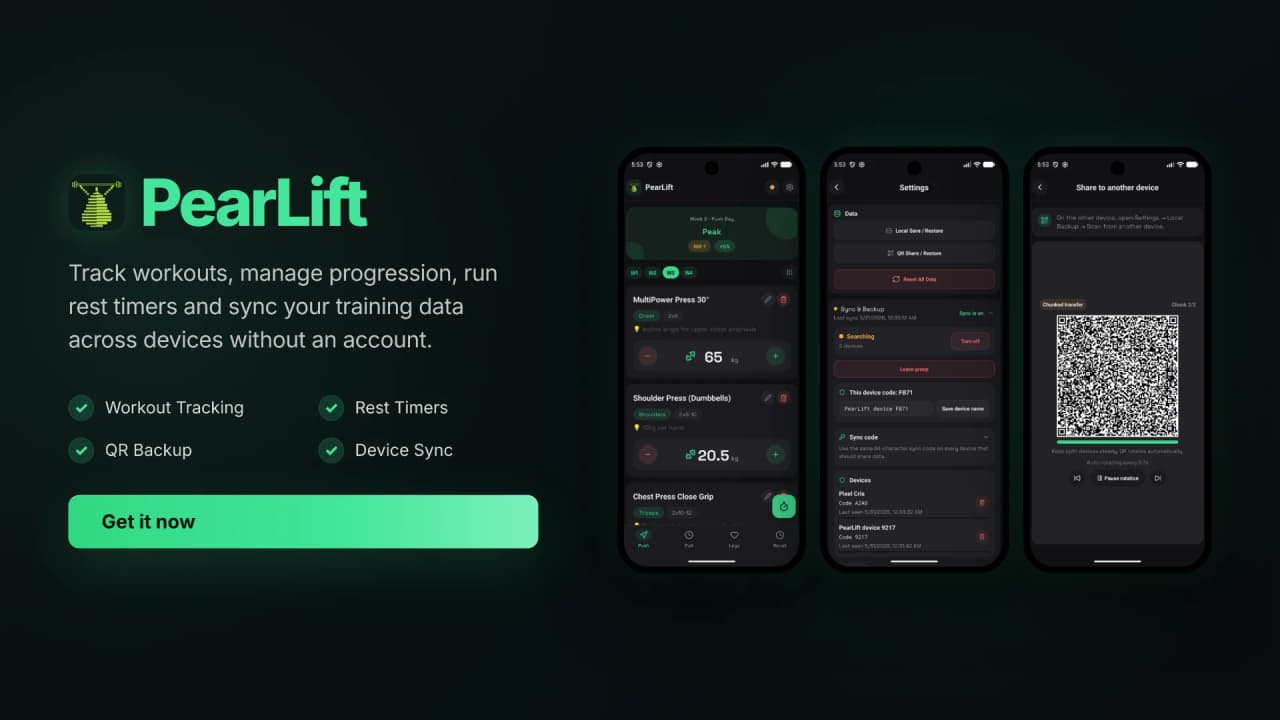
PearLift is a local-first workout tracker that does not have a backend. It does not have user accounts. Your training data lives in a SQLite database on your device and nowhere else. If you want to sync across your own devices, the app connects them directly using Holepunch, peer-to-peer, no server involved.
It supports multi-week programs with configurable day layouts, tracks weight progression in both kg and lb, and includes a background rest timer that survives the Android process killer. Backups are exportable as QR codes for device-to-device transfer, no cables or cloud accounts needed.
The name comes from the PEAR ecosystem that powers the sync layer, plus the obvious lifting reference. There is something satisfying about a pear as a mascot for a fitness app. 🍐
The Technical Craft
Core Features
- Multi-week workout programs with nested week/day/exercise configuration
- Weight tracking with kg/lb unit switching
- Background rest timer with Android foreground service and persistent notifications
- Full local backup and restore, exported as scannable QR codes
- Peer-to-peer device sync via Holepunch (Hypercore + HyperSwarm + Autobase)
- SQLite-backed storage with typed repositories and schema migrations
- Internationalization supporting English and Italian
- Zero telemetry, zero network requests beyond optional peer sync
The Secret Sauce
Built with:
- Expo SDK 56 and React Native for cross-platform mobile
- SQLite via expo-sqlite for local-first persistence
- Zustand for predictable global state
- Reanimated for fluid gesture-driven animations
- Holepunch stack (Hypercore, HyperSwarm, Autobase) for serverless P2P sync
- Bare Kit with a bundled Node.js backend running on-device for sync orchestration
- i18next for runtime translation
- Biome for linting and formatting, Bun for testing, Maestro for E2E flows
 pearlift_showcase
Architecture
The sync layer is where things get interesting. Normally, a mobile app that syncs data talks to a REST API or a WebSocket server. PearLift does neither. Each device runs a bundled Node.js backend inside a separate JavaScript engine via react-native-bare-kit. That backend manages Hypercore replication, Autobase merging for conflict resolution, and peer discovery through HyperSwarm's DHT. The React Native layer communicates with this backend through an RPC bridge.
This means sync discovery happens across local networks and through distributed hash tables, not through a centralized server. Two devices find each other, authenticate using a shared pairing secret, and replicate their workout data directly. No server. No relay. No third party reading your deadlift numbers.
The rest timer uses a native Kotlin foreground service module. Android kills background processes aggressively, especially on newer OS versions. A foreground service with a persistent notification is the only reliable way to keep a timer alive when the user switches apps or locks the screen. Timer state is mirrored in SQLite so it survives full app restarts.
Challenges and Solutions
The P2P Sync Labyrinth
- Challenge: Peer discovery, conflict resolution, and running a Node.js backend on a mobile device. The Holepunch libraries are minimal by design, they expose the primitives but there is no abstraction layer. Documentation is sparse, and almost no one had done this on React Native before
- Solution: Matched use cases against the official docs piece by piece, reasoning through the logic with the help of AI to bridge the gaps where the docs ran out. Repeated trial-and-error testing across emulator and real device via adb and Maestro E2E flows
- Result: Two devices can discover each other, authenticate with a pairing secret, and replicate workout data peer-to-peer. No server required. I still do not claim to fully understand the internals of every Holepunch library, but the sync works
The Android Foreground Service
- Challenge: Android 14 changed foreground service rules significantly. A rest timer must keep counting when the user opens Instagram or locks the phone, and it must fire a notification at the right moment
- Solution: Built a native Kotlin foreground service module with persistent notification channels. Timer state is written to SQLite so it survives process death. The notification shows remaining time and offers stop actions
- Result: Music plays, screen goes off, timer keeps counting, notification fires on time
Behind the Scenes
This project started as a PWA that synced via GitHub Gists. It was ugly, it was simple, and it was mine. When I decided to turn it into a full app, I had two goals: build something I would actually use at the gym every day, and test whether the PEAR/Holepunch stack was viable for real-world mobile applications.
I built it solo with AI assistance, focusing on architecture and testing from day one. The E2E test setup is a small engineering story in itself: one emulator, one real device connected via adb, Maestro orchestrating the flows, and the AI agent running sync diagnostics by parsing JSON output from the test logs. Another level of madness but it works.
Most of the development happened in a matter of weeks. AI accelerated the coding significantly. But the architecture decisions, the data model, the sync strategy, those were deliberate choices informed by actually using the app between sets at the gym. Every time the timer notification did not fire or the weight progression calculated wrong, I would fix it right there because I needed it to work for the next set.
The app is built around my real multi-day workout schedule. The programs, the exercises, the rest durations, they came from my actual training. That is why the features feel cohesive. I was not guessing what a gym-goer might want. I just built what I needed and then polished it enough that others could use it too.
A friend helped test the sync occasionally, connecting from a different device to verify that discovery and replication worked across networks. Beyond that, it has been a one-person project from the first line of the PWA to the pending F-Droid submission.
What Is Next
- The F-Droid release is the immediate priority, blocked on upstream library changes
- Sync reliability still needs hardening, edge cases around simultaneous edits and network interruptions
- Performance optimizations, especially around animation frame drops on older devices
- iOS support, the app is built on Expo so it should work, but the foreground service is Android-only and needs a different approach
PearLift is not the most polished workout tracker in the app store. But it is one of very few that does not send your data anywhere, syncs without a server, and gives you full control over your training history. For me, that tradeoff is worth it.