

Why buy a Raspberry when you have a Redmi?
I removed Android from a phone and turned it into a real Linux server. Then, of course, things got out of hand... 🔌
 Cristian Di CarloCristian Di Carlo
For years I've been telling Marco about my misadventures with Raspberry Pis, VPSs, Docker, networking, and homelabbing. He's always liked tinkering with things: 3D printers, electronics, hardware, small projects. Pure programming, on the other hand, has never really managed to hook him in the same way. At one point I suggested something very simple: instead of studying programming in a vacuum, why not take a small computer, put Linux on it, and just start breaking it? A Raspberry Pi, any SBC, a few containers, a couple of services, maybe Hermes Agent helping him when something inevitably stops working.
There was only one problem: the ideal budget for this experiment was exactly zero. Then something came back to me.
Wait, didn't you still have that Redmi?
Before his Pixel 8, Marco used a Redmi Note 9 Pro. It was still somewhere. My first idea was incredibly basic: let's dig it out, put something like Debian in a VM, and use it as a small server.
Then I started thinking about it. Over the last few years we've seen software run on hardware it was never designed for: jailbroken consoles, improbable ports, alternative operating systems on increasingly locked-down devices. A phone, in the end, is already a complete ARM computer: CPU, plenty of RAM, storage, Wi-Fi, USB, battery, display, sensors.
So why keep Android underneath? Wasn't there a way to get rid of it entirely and use Linux directly? That's when I remembered postmarketOS.
I'd wanted to do this for years
The funny part is that this wasn't the first time I'd thought about something like this at all. I'd wanted to be able to treat a phone like a normal Linux computer long before I bought my first Raspberry Pis, back at the end of 2021.
I've always hated the way a lot of consumer ARM hardware is treated. On a normal x86 PC you can at least enter the BIOS or UEFI, change the boot order, disable hardware, choose what to boot, and have some degree of control before the operating system even starts. On so many ARM devices, you physically buy the hardware, but a large part of the control remains tied to the vendor's platform: custom boot chains, proprietary firmware, hardware-specific descriptions, peripherals that only really work with the software intended by the manufacturer.
It's a philosophy I've never liked. If I buy something, I want to be able to break it. I want to be able to change the operating system, configure it however I want, and take responsibility for my choices, even when the consequence is spending an afternoon trying to understand why nothing works anymore.
When I checked postmarketOS and saw that the miatoll family was still maintained, even if only in testing status, the decision was basically already made. Marco's phone was a Redmi Note 9 Pro Global, joyeuse variant, and the bootloader was already unlocked. We organized everything almost immediately.
Before breaking everything, let's make a backup
A few days later I was at Marco's place with the phone on the desk. I opened a session with GPT Luna/Codex, the coding agent I use for this kind of work, and gave it a precise objective: correctly identify the device, verify every step, and save the useful partitions before we started modifying it. I didn't want a list of commands to blindly copy. I wanted the agent to check the phone's state, tell me what it was about to do, and stop if something didn't add up.
We also used OrangeFox and fastboot. In the end, the backup contained 77 .img files plus a SHA256SUMS file: boot, DTBO, modem, and a whole bunch of Qualcomm partitions whose purpose I still couldn't explain today without going back to the documentation. userdata, intentionally, wasn't there. It wasn't a magically guaranteed restore point, because that backup was never restored as a test. But before wiping Android, we had at least saved everything we considered useful.
 backup images
Then we started preparing postmarketOS.
 postmarketos images
I expected at least a few hours of problems. Instead, after a bit of messing around, the postmarketOS logo appeared. And the boot completed successfully.
 first boot
Okay. It's really Linux.
We got in through SSH over USB. The first thing we installed was, inevitably, fastfetch. Not because it was actually useful. After just removing Android from a phone that was a few years old, I simply wanted to see in black and white what was actually running.
 fastfetch
Kernel 6.14.7-sm7125, ARM64, more than 5 GiB of RAM visible to the system, Linux filesystem, shell, networking. No Android underneath. No VM. No proot. Native Linux.
A phone that would probably have sat in a drawer for years had just become a small ARM machine accessible over SSH, without us buying another computer. Throughout the whole session I kept sending videos to my friends. From the outside I think it looked even more absurd: two people in front of an old Xiaomi, excited because they could finally treat it like a server.
At that point we could have stopped perfectly happily. Naturally, we didn't.
We still had an entire phone attached to the server
If all we'd wanted was a headless server, the project was basically done. Wi-Fi, SSH, native Linux, and a 128 GB microSD mounted as additional storage. Done.
But what we had in front of us wasn't a board with no peripherals. It was still a phone. We had a 1080×2400 display, touchscreen, ambient light sensor, accelerometer, battery, and USB-C. Leaving all of that unused was starting to feel like a waste.
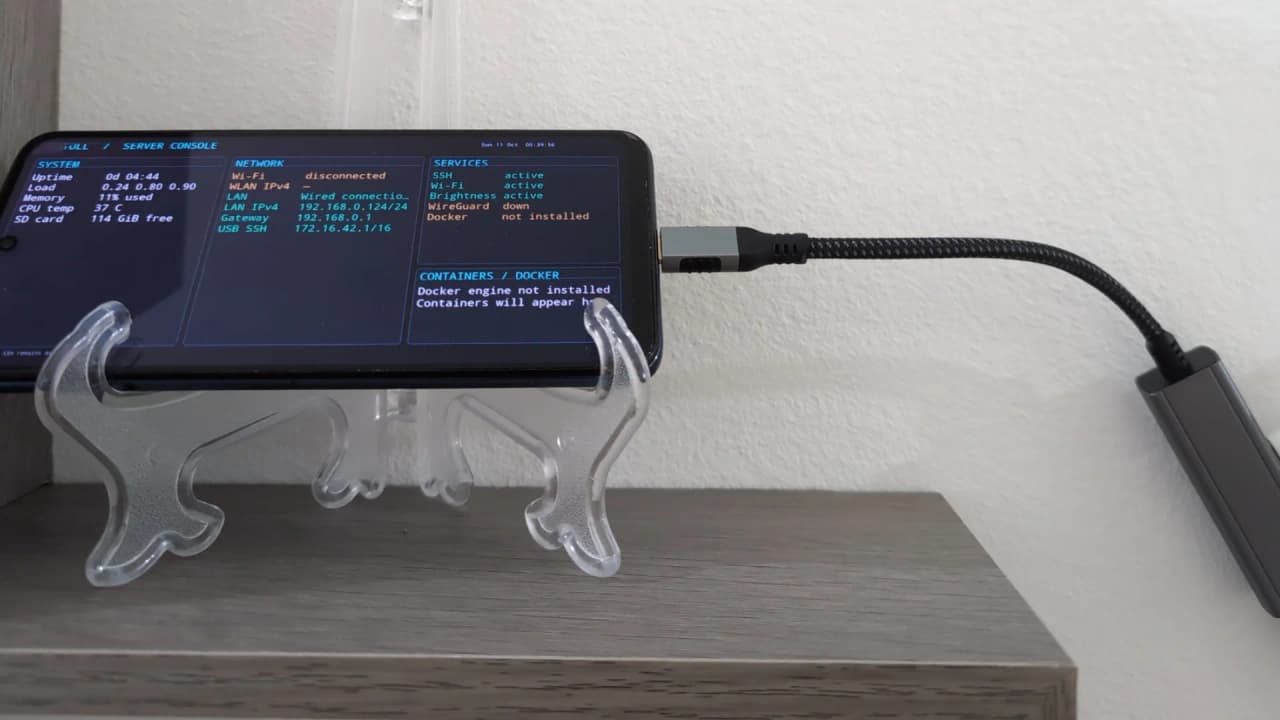
So I suggested to Marco that we use the screen itself as the server dashboard: uptime, network, IP addresses, temperature, services, and container information if and when he installed any. The agent built an initial text-based version with curses.
It worked. There was just one fairly obvious problem: the phone was in portrait.
Fine, we'll draw the screen ourselves
I thought rotating the console would be trivial. It wasn't. The kernel we were using did not have framebuffer console rotation enabled:
text # CONFIG_FRAMEBUFFER_CONSOLE_ROTATION is not set
One possible path was to start touching the kernel configuration. That wasn't exactly the rabbit hole I wanted to open just to rotate some text by ninety degrees.
The solution suggested by the agent was more interesting: stop treating the screen like a normal console and draw the dashboard directly. The renderer creates a 2400×1080 landscape image with Pillow, rotates it in userspace, converts it into the format expected by the framebuffer, and writes it directly to /dev/fb0.
I still couldn't explain in detail everything that happens between Pillow, the framebuffer, the kernel, and the display controller. But the concept was simple enough to follow: the kernel didn't want to rotate the console, so we stopped asking it to and drew what we wanted to see ourselves. And it worked.
If we have the sensors, let's use those too
At that point the dashboard was readable and showed what we needed. And obviously I started wondering what else we could recover from the hardware.
First question: does the ambient light sensor still work under Linux? Yes. So we added a service that reads the ambient light and automatically adjusts the display brightness, with some smoothing to avoid constant changes for every tiny variation.
Then I noticed something else: if Marco placed the phone on the other side, the dashboard would be upside down. I thought about using the gyroscope. Too bad the gyroscope wasn't exposed by the available sensor interface. The accelerometer was. And in the end, we didn't really need to know how the phone was rotating. We only needed to know which way gravity was pulling.
Roughly every five seconds, the renderer reads the accelerometer and decides which of the two landscape orientations to use. It's much slower than a smartphone's automatic rotation, but for a display sitting still on a shelf it's more than enough. Since we were already there, we also added a small night mode: from midnight to 08:00 the backlight goes to zero while the server keeps running. If someone touches the touchscreen, the display turns back on for 30 seconds and then goes dark again.
It was no longer just an old smartphone running Linux. It was starting to look like a small purpose-built appliance. And once again, we could have stopped there.
The next day I found another problem
The phone was literally sitting on top of the router. Wi-Fi worked fine. But the next day I started thinking about what would happen if Marco decided to actually use it as a server: WireGuard, NetBird, services reachable from outside the house, heavier transfers.
At that point a wired connection seemed much more sensible to me: more available throughput, less variable latency, and no dependence on Wi-Fi for a machine that was going to sit a few centimeters away from the router. I told him to look for a USB-C adapter with two features: Gigabit Ethernet and Power Delivery passthrough.
He found exactly the kind we needed, with a Realtek RTL8153 and a PD port rated up to 100 W. He ordered it. Two days later I was back at his place.
Ethernet works. Then we connect power.
The first part went surprisingly well. The dongle was recognized, the kernel loaded the r8152 driver, and eth0 appeared normally. Great.
Then we also connected power through the hub's PD port. And Linux started exploding. Not in the sense that the phone rebooted by itself. It stayed on, but the network could die completely and kernel Oops messages and stack traces would appear on the display. In one of the cases I remember best, the messages ran vertically across the now-stale framebuffer of the dashboard.
This is a photo of one of the worst crashes we managed to capture:
 kernel oops
It's not exactly the crash with the frozen dashboard underneath, but it gives you a pretty good idea: kernel call trace, xHCI teardown, and the Realtek dongle repeatedly appearing and disappearing. The strange part was that Ethernet on its own worked. The problem showed up when we tried to make the phone act as the USB host for the dongle and, at the same time, receive power through the same USB-C port.
Okay agent, tell me what just exploded
After a manual reboot I sent the agent digging through the persistent journal and kernel logs. This is where my technical understanding starts becoming much more superficial. I don't want to tell this story as if after one day I had suddenly become capable of reading an ARM64 stack trace and independently diagnosing a bug in Linux's USB stack. That didn't happen.
The agent found multiple instances of the same kind of issue: a use-after-free during the teardown of r8152 and xHCI while userspace was querying the state of the network interfaces. In very simplified terms: the USB device disappeared, one part of the stack was tearing it down, while another was still trying to access data that was no longer valid.
In the meantime we also found something much more mundane: linux-firmware-rtl_nic, the package containing the firmware required by the Realtek RTL8153, was missing. We installed it. Reboot. New test.
The firmware part was fixed. The main problem wasn't.
The moment I started being afraid of the word "kernel"
At that point we started considering anything: userspace workarounds, drivers, firmware, USB configuration, patches, recompilation. Every new possibility seemed to push us closer to an area where I personally had almost no real expertise.
I do web and mobile development. Terms like TCPM, DTS, DTB, xHCI, and PMIC were things I'd already heard over the years. That doesn't mean I actually knew what they did.
And this is where the agent found something much more concrete. The problem didn't necessarily require recompiling the kernel. It was in the hardware description the kernel was using.
The phone thought it was a power bank
In the device tree for the sm7125-xiaomi platform, the USB-C connector was declared like this:
dts power-role = "source";
Put as bluntly as possible: Linux was starting from the assumption that this port was supposed to provide power. The phone could act as a USB host for the Ethernet dongle, but the mainline port wasn't described in a way that allowed it to correctly negotiate incoming power as a sink at the same time.
The patch proposed by the agent changed the role to dual, preferring sink, and added sink PDOs intentionally limited to 5 V:
dts power-role = "dual"; try-power-role = "sink";
We did not recompile the entire kernel. We modified and recompiled the DTB, which is the binary form of the device tree that describes part of the machine's hardware to the kernel. That's the correct explanation.
My actual level of understanding that afternoon was closer to:
Okay, apparently this file tells Linux that the port can only provide power. We want it to be able to receive power too. Let's try it.
Of course the correct fix wasn't being loaded
We patched the DTB. Rebooted. Nothing. The system kept behaving exactly as before.
Another round of debugging. Eventually we discovered that simply putting the modified file in /boot/dtbs did not mean the system would actually use it: U-Boot was supplying its own FDT during boot. We also tried bootctl set-oneshot, only to discover that in that configuration U-Boot's EFI variables did not persist the way we expected.
In the end, the devicetree override went directly into the pmos.conf entry, explicitly pointing to the patched DTB. Another reboot. Another check. This time the port finally reported itself as dual.
Ethernet up. Connect the charger. Power Delivery negotiated at 5 V / 2 A. eth0 still up. And the fuel gauge, as incomplete and unreliable as it is on this port, at least started showing behavior consistent with charging.
It worked. Or at least we thought it did.
Cables, chargers, and other forms of suffering
We spent the rest of the afternoon trying combinations. More powerful PD chargers. A 100 W laptop charger. The old Xiaomi QC charger over USB-A. Different USB-C cables. Different Ethernet cables.
Some combinations were stable. Others started oscillating between sink and source. With others, the problems came back. The 20 W PD charger Marco had bought specifically for the little server initially seemed like one of the worst. At one point we had basically declared it guilty. Then, after hours of testing, we tried it again with its original USB-C cable. And it worked.
Stable. Ethernet active. PD active. Battery charging. No new Oops during the final tests.
The result also stayed clean through the verified reboots, using the procedure we had by then learned: let the boot settle and connect PD afterward, instead of starting with everything already attached. We never managed to scientifically isolate which variable had caused the earlier failures. The first C-to-C cable? Voltage drop? Battery state? Display load? A combination? We don't know. And I'd rather write it that way than invent an explanation after the fact.
The final state we verified was the one we cared about: USB-C hub, Gigabit Ethernet, 20 W PD charger with its cable, phone powered and connected to the LAN. We turned off Wi-Fi, moved traffic to eth0, and updated the dashboard to show LAN state, wired IPv4, and the gateway as well.
 end result
From our experiment to something that might actually help someone else
Toward the end of the day, the agent suggested something I hadn't initially considered: this change might be worth documenting properly and, maybe, proposing upstream. Usually my rabbit holes end in my homelab. I configure something, get it working, maybe open a repo because it's useful to me, and that's where it ends.
This time we had found a real problem in a device's support, produced a reproducible patch, and collected the Oops logs as well. So I asked the agent to take everything we'd discovered and turn it into something reusable. That's how miatoll-usb-pd-ethernet-fix was born, with the device tree patch, a script to reapply it after kernel updates, and the crash logs we collected during testing.
The repo now belongs to Marco, who also has a personal website. It felt right that way: the phone is his, the server is his, and the entire project started as something for him to tinker with.
The next step we'd like to try is figuring out whether at least part of this work makes sense upstream. There isn't a PR yet and I don't want to pretend there is. For both of us it would be something new: instead of making yet another project for our own shit, actually entering the process of an open source project and seeing what happens when a patch meets real maintainers. Even if they tell us it's completely wrong, we'd probably learn something.
No, I did not learn kernel development in one afternoon
This part matters to me. After all of this, I do not know how to develop the Linux kernel. I wouldn't know how to implement this phone's USB-C support from scratch. I wouldn't know how to correctly design a device tree for a Qualcomm platform. If tomorrow someone handed me another device with a different problem, without the agent and without documentation I'd be almost back at square one.
I understood enough to follow the thread: see what was being modified, ask why, compare behavior before and after, and stop when something didn't add up. But I don't want to confuse "I managed to do this with an agent" with "I now possess all the skills behind it."
That is, though, one of the things I find most interesting about modern agents. They don't magically give you years of experience. They can, however, lower the barrier to entry enough to let you put your hands on problems that, until recently, you would have simply avoided because you wouldn't even know where to start. Then it's up to you to decide how much you actually want to understand, how much you want to trust, and how much responsibility you're willing to take when you're touching something that might stop booting at the next reboot.
So why buy a Raspberry?
The serious answer is that if you simply want a small, predictable, well-supported server, buying a Raspberry Pi or another SBC is still a much simpler choice. But in this case, the point wasn't to find the simplest path.
We could have used Android and a VM. We could have stopped as soon as SSH started working. We could have left the display off. We could have ignored the sensors. We could have kept Wi-Fi. We could have given up on Ethernet as soon as the first kernel Oops appeared. At every one of those points, stopping would have been the more reasonable choice.
But sometimes making your life harder this way gives you experiences you otherwise would never have had. During those days we touched, even if only superficially, framebuffer, Qualcomm sensors, systemd, USB-C Power Delivery, U-Boot, device tree, and parts of Linux's USB stack. I can't say I actually learned them, but now at least I've seen them fail in front of my eyes for a concrete reason.
And above all, we recovered almost everything that phone had to offer. CPU, RAM, storage, display, touchscreen, accelerometer, light sensor, USB-C. Hardware that could have spent years in a drawer is now doing something useful.
That gets me much more excited than the money saved by itself. I like the idea that the hardware I own can keep being mine even after the vendor stops caring about it. I want to be able to change the software, remove what I don't need, use a peripheral in a way that wasn't intended, and take responsibility when I break everything.
Zero vendor lock-in, as far as possible. Total control, with all the problems that come with it.
It's not over yet
The port is still incomplete. Battery management, for example, is still half broken: the gauge exposes capacity, voltage, current, and temperature, but the charging stack isn't complete and status can remain Unknown.
If I actually had the skills to work at that level, that would probably be the next thing I'd try to fix. For now, I don't. And AI tokens, unfortunately, aren't infinite.
There are also at least two interesting things left to investigate: the device tree change and the use-after-free we observed during the sudden teardown of the USB network adapter. We'll see whether this experiment actually turns into an upstream contribution.
For now, it's enough for me to know that all of this started with a much dumber question:
"Didn't Marco still have that old Redmi?"
And a few days later that Redmi was running native Linux, showing its own dashboard, adjusting its brightness by itself, and getting both network and power through the same USB-C dongle. I'd say we went far enough.